How to Acknowledge an Email with Confidence and Speed
Learn how to acknowledge an email with clear, professional replies. Get timing guidance, ready-to-use templates, and tone tips for every context.
Written by
 Mathias Michel
At 8:47 a.m., you open your inbox and see 47 unread emails. One asks for a decision, another contains a client complaint, and a third needs documents you haven't reviewed yet. You can't give every sender a complete answer immediately, but leaving every message untouched creates a different problem. People don't know whether you've seen their request, whether it's being handled, or whether they need to follow up.
Learning how to acknowledge an email solves that gap. A good acknowledgment confirms receipt, shows that you've understood the subject, and sets an honest expectation for the next response. It doesn't pretend that the work is finished. It makes the next step visible.
What It Really Means to Acknowledge an Email
An email acknowledgment is a short, human-written reply that tells the sender three things: you received the message, you understand what it concerns, and you know what happens next. You may not have the answer yet. You may need to check a contract, ask a colleague, investigate an account, or prioritize competing requests. The acknowledgment exists to confirm that the message entered your workflow.
That distinction matters. A complete reply solves the underlying problem. An auto-reply announces that you're unavailable or that a system received the message. A read receipt only indicates that a message was opened, and it doesn't communicate understanding or ownership. A real acknowledgment adds context that automated signals can't provide.
Practical rule: Confirm the message before you solve the problem.
A useful acknowledgment should name the topic rather than say only “Got it.” Compare these two replies:
- “Got it.”
- “I received the revised proposal and am reviewing the pricing section now. I'll send you my comments after I complete the review.”
The second version reassures the sender because it proves you've read the message and identifies the next action. It also avoids claiming that you already have an answer.
What a strong acknowledgment accomplishes
A well-written confirmation reduces uncertainty for the person waiting. That usually means fewer “Did you see this?” follow-ups, less duplicated work, and a clearer record of who owns the next step.
It also strengthens professional trust. Clients want evidence that their request is in a queue. Colleagues want to know whether they should keep working around a missing decision. Vendors and executives need a response that respects the importance of their message without forcing you to produce an incomplete answer.
Use a human acknowledgment when:
- The request needs research: Tell the sender you've received it and when you'll return with a considered response.
- The sender is waiting on you: State the next action so they can plan around it.
- The issue is sensitive or urgent: A specific reply signals attention and prevents avoidable escalation.
- You disagree or need clarification: Confirm receipt first, then identify the point that requires discussion.
The ideal message is brief, specific, and truthful. Don't use a short acknowledgment to hide a delay. Use it to manage the delay responsibly.
Why Timing Matters More Than You Think
Email expectations have moved closer to real-time communication. A 2026 email response-time benchmark reports an average cross-company response time of 12 hours and 10 minutes, while a customer-service benchmark reports an average of 14 hours and 54 minutes. Those averages conceal major differences by context. Customer support teams averaged 1 hour and 22 minutes, sales inquiries averaged 47 hours, and only 23% of companies replied within five minutes, according to the same source.
Senders often expect much faster attention. The benchmark summary reports that 88% of customers expect a reply within 60 minutes, while 90% consider an “immediate” response essential or very important. Your full solution may require far more time, but the first signal shouldn't have to wait for the final answer.
Benchmarks by situation
| Context | Sender expectation | Typical actual response |
|---|---|---|
| Customer support | Within 60 minutes is a common expectation | 1 hour and 22 minutes on average |
| Cross-company business email | Fast confirmation, followed by a considered answer | 12 hours and 10 minutes on average |
| Sales inquiry | Rapid contact can influence the opportunity | 47 hours on average in the cited benchmark |
These figures support a practical operating rule: acknowledge promptly during the working day, then separate that confirmation from the time required to resolve the request. Same-day communication is a sensible standard for internal messages, and external stakeholders generally deserve a response within the business day or within 24 hours when the matter requires more review. The exact deadline depends on your role, time zone, and service agreement, but silence should never be your default.
Why waiting for the full answer fails
When you delay acknowledgment until the work is complete, the sender has to guess. They may send another message, copy your manager, call another department, or assume that their request isn't important. In sales and service contexts, that uncertainty can affect outcomes. Research cited by Consul's email response-time analysis reports that 35% to 50% of sales go to the first responder, and lead qualification can fall 10 times after five minutes.
Don't interpret that as a demand to solve every problem instantly. Interpret it as a reason to send a clear receipt confirmation before the inbox goes quiet.
The Receipt Versus Commitment Framework
The cleanest method has two layers.
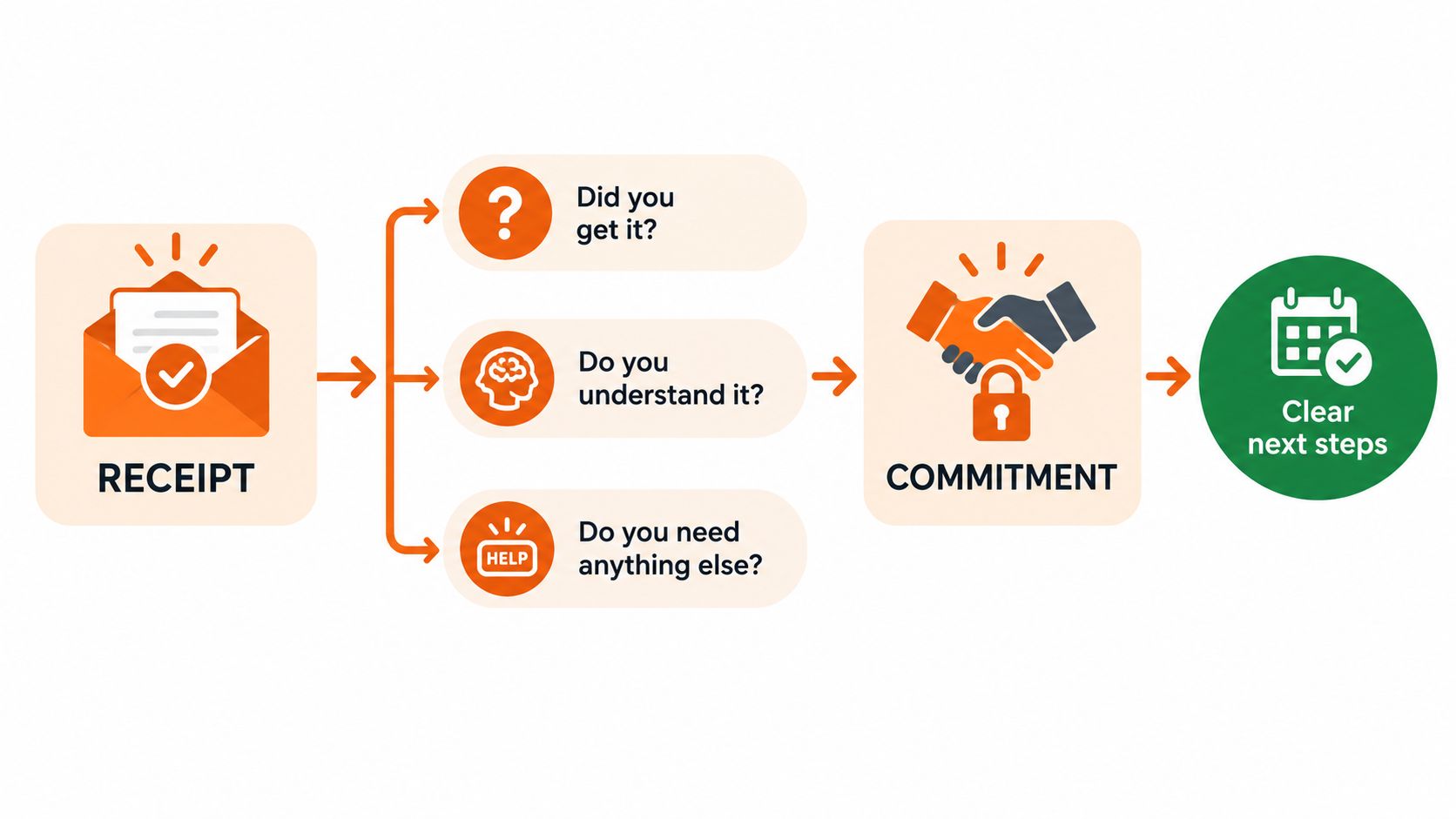
Receipt confirms that the message arrived and that you've understood the request. Commitment states what you'll do next and when the sender can expect a fuller answer. The first layer can take one sentence. The second layer should contain a deadline only when you can realistically meet it.
Start by answering these questions:
- Did you receive the message? Use direct language such as “I received your proposal.”
- Do you understand the request? Name the document, decision, issue, or task.
- What happens next? Give the next action and a reliable time for the full response.
A short acknowledgment might read:
“Got it, Sarah. I'm reviewing the contract now and will send marked-up notes by Thursday.”
This works because it confirms receipt, identifies the work, and creates a commitment without pretending the review is already complete.
For a larger request, add scope and clarification:
“Received your RFP. I've added it to our review queue and identified three clarifying questions. I'll send those questions first, then follow up with a draft response by next Tuesday.”
That message distinguishes current action from future delivery. It doesn't promise approval, a finished proposal, or a result you can't control.
Keep the promise narrower than the uncertainty
If you don't know when the final answer will be ready, commit to the next checkpoint instead. For example:
“I received your request and need to confirm the reporting details with Finance. I'll update you tomorrow with either an answer or a revised timeline.”
That's more credible than promising a finished answer by tomorrow when another team controls part of the work. Avoid phrases such as “I'll get back to you soon” because they sound polite but provide no usable expectation.
Before sending, check:
- Receipt: Have you clearly confirmed that you saw the email?
- Understanding: Have you named the actual subject?
- Action: Have you said what you'll do next?
- Timing: Is the deadline realistic and within your control?
- Boundaries: Have you avoided implying that the final answer is ready?
- Clarity: Can the sender understand the message without rereading the original?
For guidance on keeping email references clear, see this resource on using CC in an email. Copy the acknowledgment only after replacing every name, date, document title, and placeholder.
Acknowledgment Templates for Every Context
The same structure changes with the relationship. A client needs precision, a customer needs reassurance and a reference point, and a teammate usually needs speed without unnecessary ceremony.
| Context | Short reply | Extended reply |
|---|---|---|
| Formal client, vendor, or executive | “Thank you for sending the revised agreement. I've received it and will review the commercial terms before replying by Thursday.” | “Thank you for sending the revised agreement. I've received it and am reviewing the commercial terms, delivery obligations, and approval requirements. I have one question about the renewal language, which I'll include in my notes. I'll send a consolidated response by Thursday.” |
| Customer support | “We've received your message about order [number] and are checking the delivery status. I'll update you by [time].” | “Thanks for contacting us about order [number]. We've received your message and are checking the delivery record with our fulfillment team. I understand that the missing update is the main concern. I'll contact you again by [time] with the status and available next steps.” |
| Internal team | “Received your launch checklist. I'll review the open items and comment before our [meeting or deadline].” | “I received the launch checklist and understand that you need owners confirmed for the remaining tasks. I'll review the open items, flag any conflicts, and add comments before [time]. If the release date has changed, send me the new target so I can assess the dependencies.” |
The formal version should sound controlled, not ceremonial. Customer support replies should acknowledge the customer's concern, not just the ticket. Internal messages can be shorter, but “short” doesn't mean vague.
Spot the accidental commitment
A common mistake is turning an acknowledgment into an unsupported promise:
- Weak: “I'll resolve this today.”
- Better: “I've received the issue and am checking the account history. I'll send a status update today, even if the full resolution requires more time.”
The corrected version commits to an update, which you control, rather than a resolution that may depend on technical or operational work.
For more adaptable wording, use these business email templates as a starting point, then tailor the message to the sender and request. Replace every bracketed placeholder before sending. A template should accelerate judgment, not replace it.
Tone and Cultural Cues That Change Everything
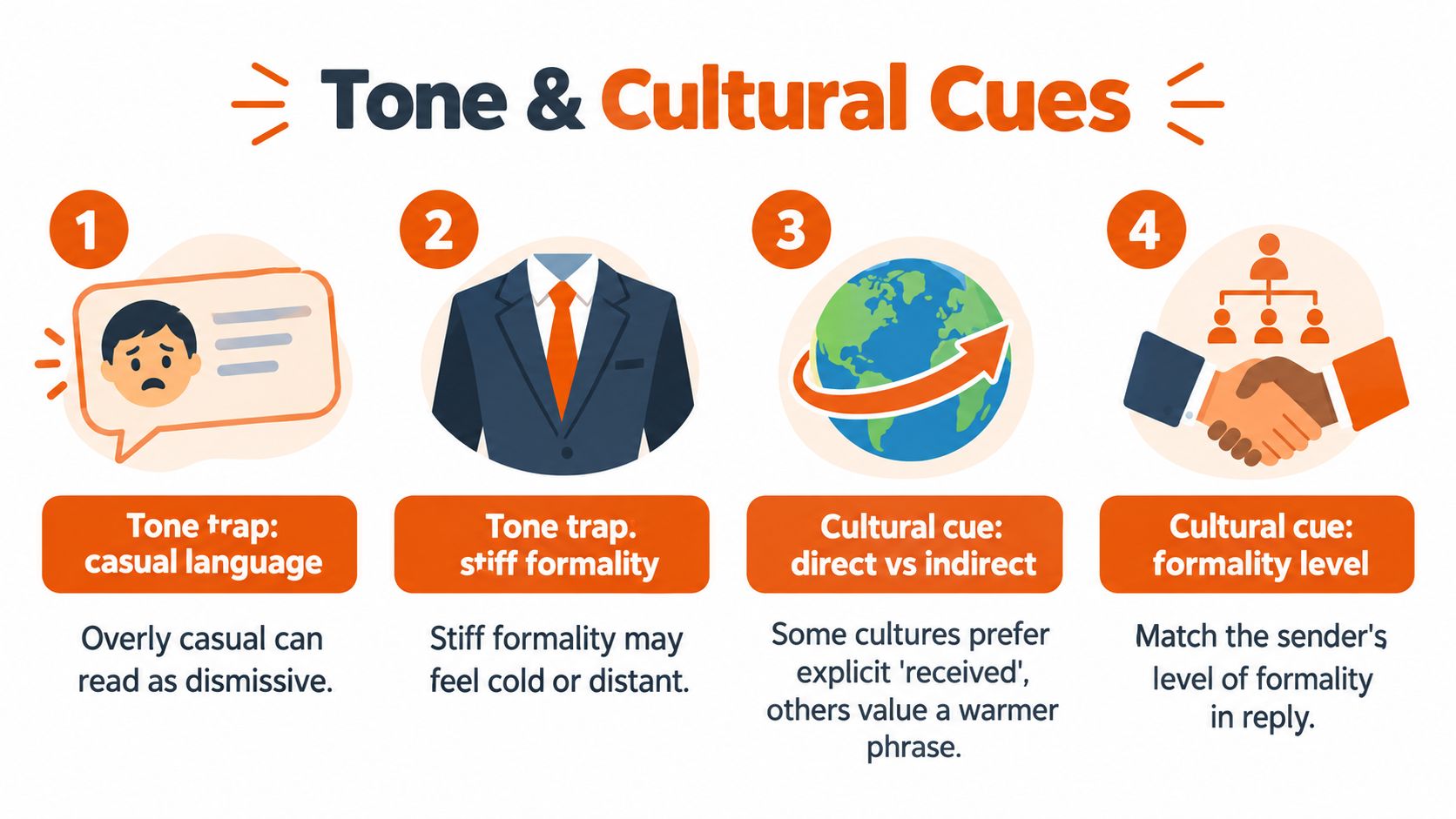
A technically correct acknowledgment can still sound dismissive. “Duly noted” may feel bureaucratic, and “Well received” can sound unnatural or sarcastic in some settings. “Got it” may work with a close teammate, but it can seem abrupt when sent to a client, senior leader, or person writing in a second language.
The safest tone is specific, calm, and proportionate. Match the sender's level of formality, but don't copy stiffness that makes the message harder to read.
Adjust for relationship and context
Communication norms vary across regions and organizations. US business writing often favors friendly directness. UK correspondence may soften requests with more indirect phrasing. German business communication commonly values precision and clear structure. Japanese professional exchanges may place greater weight on hierarchy, respect, and carefully moderated disagreement. Brazilian business communication may allow a warmer relational tone, especially when trust and rapport matter.
These are tendencies, not rules for every individual. Treat the sender as a person, not as a cultural stereotype. If you're replying across languages or time zones, choose plain verbs and avoid idioms, jokes, sarcasm, and phrases that depend on local workplace habits.
Use “Thanks for your patience” when the delay is limited and the relationship is established. Use “We apologize for the inconvenience” when the situation has caused a clear service problem or requires a more formal apology. Don't apologize repeatedly for ordinary processing time. One accurate apology is stronger than several empty ones.
Run a tone check
Before you send, ask:
- Address: Is the greeting suitable for the sender's seniority and relationship to you?
- Verb strength: Does “I will” describe a real commitment, or would “I expect to” be more accurate?
- Apology: Is an apology warranted, or are you weakening a routine update?
- Warmth: Does the closing sound respectful without becoming overly familiar?
If your team handles high-volume outreach, guidance on how to hire cold callers can also help clarify the difference between rapid contact and thoughtful follow-up. For broader standards, review this guide to business email etiquette before setting shared team language.
Subject Lines and Opening Lines That Set the Right Tone
Most acknowledgment emails should remain in the original thread. The existing subject carries context, preserves the conversation, and helps the sender find your response later. Change it only when the topic has materially changed.
Use one of these subject-line patterns:
Confirm receipt
- “Received, [document name]”
- “Your request received”
- “Re: [original subject]”
Set expectations
- “Received, response by [day]”
- “Reviewing [project or request]”
- “Next steps for [topic]”
Request information
- “Received, clarification needed”
- “Question about [document or issue]”
- “Details needed for [request]”
The opening line should identify what you read. For a client, write, “Thank you for sending the revised statement of work.” For support, include the ticket or order reference. For an internal request, name the decision or task: “I received the launch checklist and understand that you need final ownership assigned.”
Avoid “Just a quick note,” “Per my last email,” and “I wanted to follow up.” Those phrases use space without confirming anything. Start with the message itself.
Don't create a chain of “RE: RE: RE:” subject lines that bury the topic. Keep the original subject unless a meaningful change requires a new one, and make the first sentence specific enough to stand alone in a preview pane.
Quick Reference and Common Questions
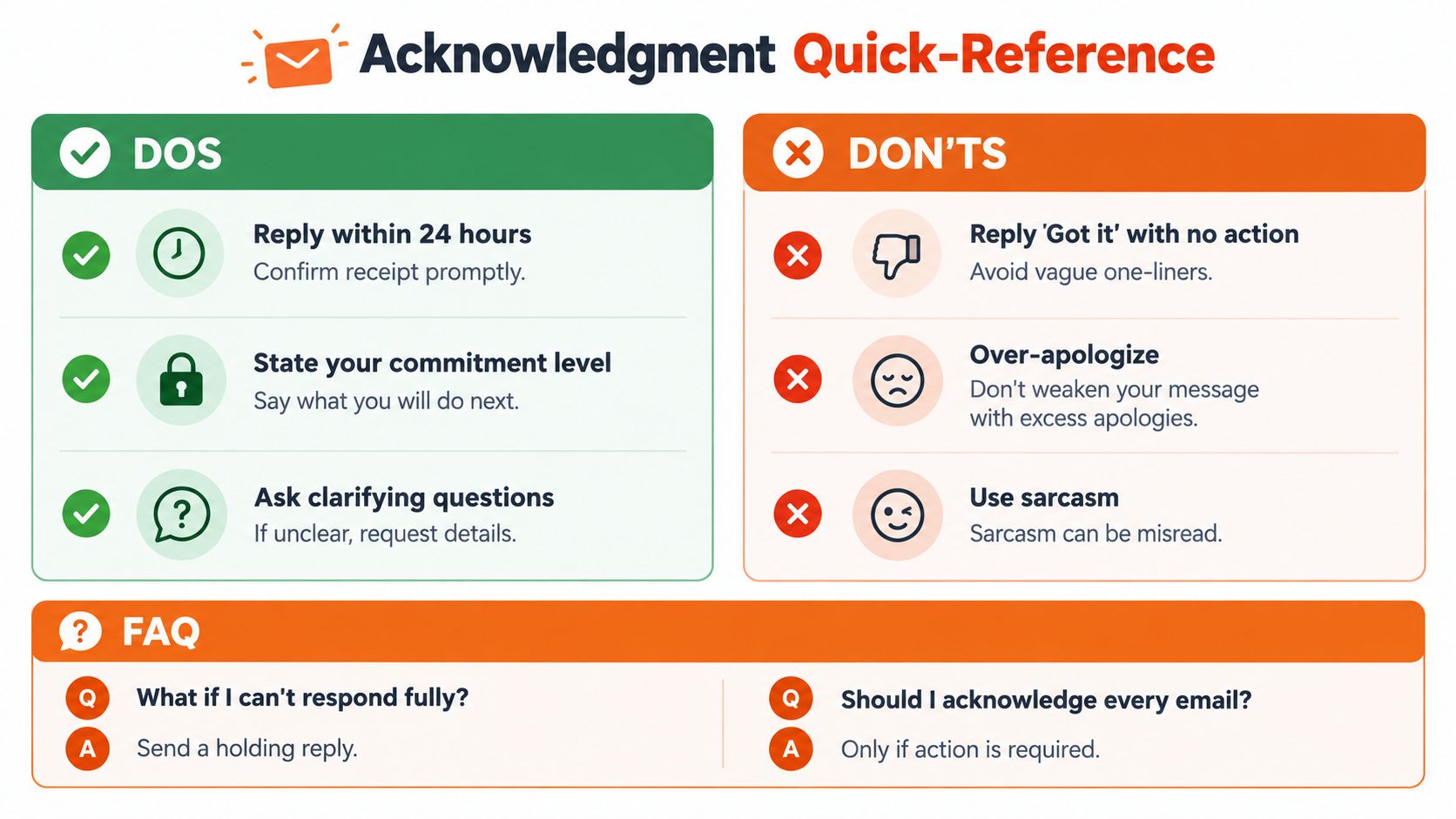
Use this checklist when your inbox is crowded and you need to respond without overpromising.
Do:
- Confirm receipt: Tell the sender you've seen the message.
- Restate the request: Name the topic so they know you understood it.
- State the next action: Explain whether you'll review, investigate, ask someone, or decide.
- Give an honest checkpoint: Promise an update only when you can meet it.
- Flag delays early: Send a new holding message before the original deadline passes.
Don't:
- Send “Got it” alone: It gives no useful context.
- Promise an outcome: Commit to an action or update, not a result outside your control.
- Over-apologize: Excessive apologies can make a routine delay sound worse.
- Use sarcasm: Short written messages lose vocal cues and are easy to misread.
- Reply all unnecessarily: Keep internal acknowledgments away from people who don't need them.
Common questions
Should I acknowledge every email?
No. Acknowledge messages that require action, contain important information, involve a relationship you need to maintain, or could reasonably leave the sender waiting. Routine newsletters and messages that require no response don't need a personal confirmation.
What if I can't respond fully?
Send a holding reply. Confirm receipt, identify the next step, and provide the earliest reliable time for an update. Don't invent certainty just to make the message sound finished.
Should I use an auto-responder?
Use one for predictable unavailability, such as leave, travel, or limited access. It shouldn't replace a specific human acknowledgment when the matter is urgent or sensitive.
When should I send a hold message?
Send it as soon as you know the full answer will be delayed. Waiting until the promised time has already passed turns a manageable delay into a trust problem.
What if I disagree with the email?
Acknowledge the message without endorsing its conclusion: “I received your recommendation. I understand the proposed approach, but I need to review the cost and delivery implications before I can support it.” Then address the disagreement in the full response.
Use a short receipt message to create clarity, not to avoid responsibility. The best acknowledgment makes the sender less anxious while keeping your commitment accurate.
RewriteBar can help you draft a professional acknowledgment, adjust its tone, and compare wording before you send it, with reusable workflows for fast email replies. Visit RewriteBar to refine messages directly in the apps where you write.

More to read
8 Client Thank You Note Templates for 2026
Craft the perfect client thank you note with 8 expert templates for any scenario. Includes examples, checklists, and AI-powered writing tips for 2026.
Closing a Letter: Your Guide to Perfect Sign-Offs
Choose the right closing a letter sign-off with 20 examples, when to use each one, and exactly where your signature goes in print and email.
What CC in an Email Means A Guide for Modern Professionals
Unsure what CC in an email means? Learn the difference between To, CC, and BCC, plus when and how to use them with our clear examples and etiquette tips.
Tags
Written by
Mathias MichelPublished
September 18, 2026