7 Best Writing Templates for Faster Work
Explore the best writing templates for emails, summaries, user stories, social posts, and code comments—and learn how to use them in RewriteBar.
Written by
 Mathias Michel
A blank document rarely causes the actual delay. You already know the point you want to make, but you lose time deciding whether the message should be shorter, warmer, more persuasive, better structured, or formatted for another channel. By the time you settle on a shape, the writing task has expanded into an editing task, a formatting task, and sometimes a project-management task.
The best writing templates solve that problem by encoding decisions before drafting starts. They define the audience, purpose, required inputs, evidence, tone, and expected output instead of offering an empty page with a few placeholder headings. Historical writing workflows have used reusable structures for centuries, from formal contracts and wills to business documents produced more efficiently with typewriters and later word processors. This history of writing templates explains why templates remain useful even as the tools change.
The seven options below solve different writing problems. RewriteBar is for fast, in-context transformations across macOS apps. Notion is for structured long-form projects, Canva for visual documents, Google Docs and Word for standardized collaborative writing, Jasper for on-brand marketing drafts, and Copy.ai for repeatable sales and content workflows.
1. RewriteBar for rewriting text without leaving the app
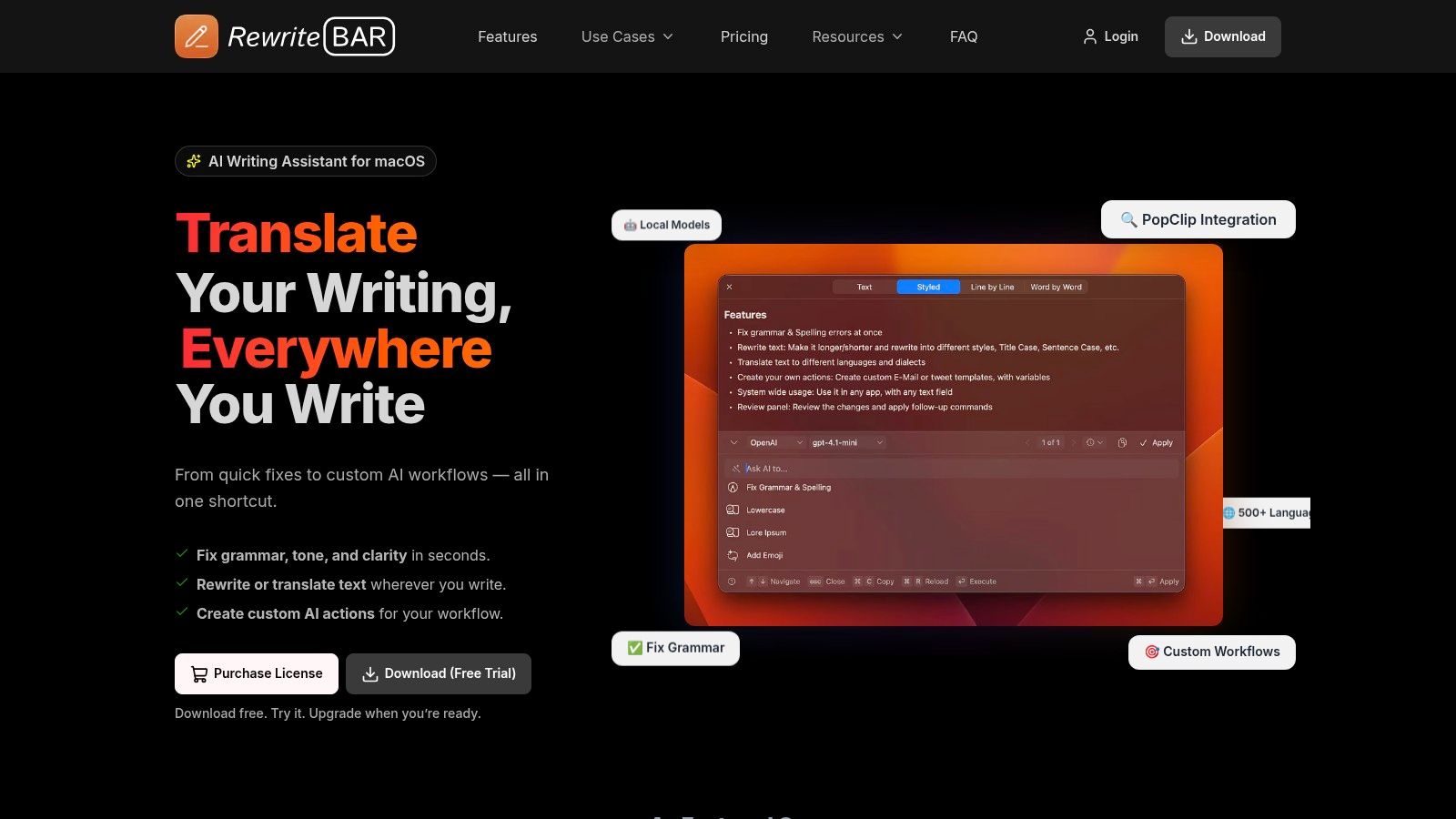
RewriteBar is the strongest choice when the writing already exists but needs to become clearer, shorter, more professional, more natural, or better suited to a different audience. It runs from the macOS menu bar, so you can highlight text in an email, browser, editor, chat window, document, or code environment and trigger a rewrite with a keyboard shortcut. You don't need to copy text into a separate AI chat, explain the context again, and paste the result back.
Its built-in actions cover practical corrections such as grammar, spelling, tone, clarity, translation, summarization, and simplification. You can also create reusable prompts for recurring work, including summaries, user stories, structured outputs, JSON repairs, and tone changes. Side-by-side comparison makes the result easier to inspect, which matters when a rewrite must preserve meaning rather than merely sound smoother.
Where it fits best
RewriteBar works particularly well for people who repeat the same transformation throughout the day:
- Non-native English speakers: Turn literal phrasing into natural English while keeping the original meaning.
- Developers: Repair JSON, rewrite code comments, summarize error messages, or adjust technical explanations without changing code-sensitive content.
- Content creators: Convert a long draft into a short post, a hook, a summary, or a different tone.
- Students and founders: Turn rough notes into emails, briefs, user stories, and decision-ready summaries.
The template is the action itself. A useful one should specify the role, the transformation, the constraints, and the output format. For example, a “customer update” workflow can instruct RewriteBar to preserve all dates and commitments, remove internal jargon, use a calm tone, and return a subject line followed by a concise message. That is much more reliable than repeatedly asking an AI tool to “make this better.”
Practical rule: Save the transformation you perform repeatedly, not the prompt that sounds clever.
RewriteBar also gives you deployment choices. You can connect cloud providers or use local models through tools such as Ollama, LM Studio, or Apple Intelligence, depending on the privacy and setup requirements of the workflow. The product states that it doesn't store your text or API keys on its servers, and its macOS writing assistant is designed to complement tools such as ChatGPT, dictation software, and grammar checkers rather than replace them.
The trade-off is platform scope. RewriteBar is built for macOS, and local-model or bring-your-own-key configurations can require technical setup. If you need shared databases, document permissions, or a campaign calendar, choose a broader workspace. If you need to improve text wherever you happen to be writing, this is the most direct option on the list.
2. Notion Template Gallery for long-form projects with moving parts
Notion is a better fit when writing is only one part of the job. A book, research project, editorial program, or submission pipeline needs more than a page template. It needs statuses, owners, source records, deadlines, related drafts, comments, and a way to see the project at different levels.
The Notion Writing template gallery includes pages and databases for blog planning, book development, outlines, editorial calendars, submission tracking, character notes, and world-building. You can duplicate a template into a workspace, then change its properties, views, relations, and rollups. That makes Notion particularly useful when a document must remain connected to the research and production work around it.
How to adapt a Notion writing template
Start with the smallest useful schema. A blog database might need a title, target audience, search intent, status, writer, review date, source links, and final URL. A book workspace might need chapters, scenes, characters, research notes, and unresolved questions. Don't add every possible property on the first pass. Complexity becomes a burden when nobody knows which fields matter.
Use relations when two types of information need to stay connected. A chapter can link to its research notes, a character can link to scenes, and an article can link to the sources used during drafting. A dashboard can then surface unfinished work without forcing you to search through pages manually.
A template should reduce decisions, not create a second job in the name of organization.
The main weakness is inconsistency. Community templates vary widely in quality, and a visually impressive dashboard may contain a fragile database structure that doesn't match your process. Test a duplicated template with a real project before making it the team standard. The procedure documentation templates guide is useful when the writing needs repeatable steps, ownership, and review rules rather than a simple draft page.
Notion also has a learning curve. It supports collaboration, comments, and cross-device access, but users need to understand databases and views to get the full benefit. Choose it when the project has relationships and workflow states. For a one-page letter or a quick shared brief, it can be more system than you need.
3. Canva Docs for writing that must become a visual deliverable
Canva is the practical choice when the finished writing needs to look designed, not merely correct. A proposal, one-page report, campaign brief, presentation handout, social asset, or branded PDF often moves directly from words into a visual format. Canva Docs reduces the gap between those stages by combining document templates, drafting assistance, layout tools, collaboration, and export options.
Magic Write can help generate outlines, expand sections, shorten copy, and create social variations inside a document. The useful distinction is that the draft sits close to the design system. Brand Kits can help teams keep visual elements and brand conventions consistent across assets, while collaborators can review the document before it becomes a final presentation or downloadable file. Explore Canva Docs and Magic Write for the current template and AI features.
A reliable Canva workflow
Don't begin by choosing the most decorative template. Start by writing down the communication job:
- Define the reader: Identify who will scan, read, approve, or share the document.
- Set the hierarchy: Decide what must be seen first, what supports it, and what can be omitted.
- Draft in sections: Give each block one job, such as context, recommendation, proof, or next step.
- Design after the message is stable: Use layout to clarify the argument, not to hide a weak one.
Canva is especially effective for teams that need a master document plus channel variants. A campaign brief can become a one-page internal summary, a social graphic, and a presentation slide without rebuilding the visual system each time. The guide to AI writing offers useful context for treating AI as a drafting and transformation layer rather than an automatic substitute for editorial judgment.
The trade-off is control. Canva is beginner-friendly and fast, but advanced page-layout work may require more granular controls than it provides. Premium templates and assets can also require a paid plan. Choose Canva when presentation quality and brand consistency are part of the writing problem. Choose Word or Google Docs when the document is primarily text, references, comments, and revision history.
4. Google Docs Template Gallery for shared standards
A team preparing weekly reports can lose time before anyone writes a sentence. People search for the latest file, copy an old version, and discover that headings or approval fields differ. Google Docs addresses that coordination problem with a shared starting point.
Its template gallery includes formats for letters, proposals, meeting notes, reports, and other common documents. Google Workspace administrators can also curate organization-level galleries, so employees begin with approved formats rather than files copied from old folders.
The Google Docs Template Gallery opens a template as a new document in Drive while keeping the original unchanged. That protects the master file. Comments, real-time editing, and version history keep drafting and review in one shared workspace.
Adapt the template to the workflow
Start with the decisions the document must support. Add heading styles, short instructions, placeholders, and fields for information people regularly omit. If the audience, source links, approval owner, or final call to action matters, place those prompts near the top. Keep guidance visible during drafting, then remove it before delivery.
Build the file around a stable document type:
- Meeting notes: Provide space for decisions, owners, unresolved questions, and follow-up dates.
- Proposals: Separate the client problem, recommended approach, scope, assumptions, and next step.
- Reports: Set sections for the executive summary, evidence, limitations, findings, and actions.
- Blog briefs: Capture search intent, audience, angle, sources, headings, and conversion goal.
For a fast import workflow, duplicate the approved file, rename it for the assignment, and replace each placeholder in order. Writers can draft directly in the document, then use RewriteBar for focused rewrites while preserving the brief's audience and required sections. This keeps the template as the source of structure while the writing tool handles targeted revisions.
Templates reduce omissions, not editorial responsibility. A completed brief can still contain weak reasoning, inaccurate claims, or unsuitable sources. The blog post format guide helps shape the brief before it becomes a shared Google Docs file.
Google Docs offers fewer specialized templates and less precise formatting than desktop publishing software. Those limits matter for highly designed or pagination-sensitive documents. For teams that need shared access, comments, version history, and consistent standards across devices, it is a practical fit.
5. Microsoft Word Templates for formal documents and controlled formatting
A submission with strict page limits, a report with references, or a contract that must export cleanly to PDF needs more than a well-written draft. Microsoft Word suits these documents because pagination, styles, references, headers, and file delivery are part of the writing task. It works for contracts, resumes, formal proposals, newsletters, reports, and other documents where layout changes can affect the final result.
Start with the Microsoft Word template gallery when the document type is familiar. It supplies working arrangements for margins, headings, tables, headers, and footers, so writers can adapt a structure instead of building one from a blank page. For recurring work, save an approved .dotx file in a shared, controlled location and create a fresh document for each assignment. Eligible Microsoft 365 plans can also use Copilot to draft or refine text inside the file.
Set the rules before drafting. A useful Word template includes a style system, not just polished sample pages. Define heading levels, body text, captions, quotations, lists, page numbers, and reference formatting in advance. Add brief instructions where writers may need context, plus fields for the author, date, version, reviewer, and document status. Use named styles rather than manual formatting, then test the file with both a short and a long draft. Protect sections that users should not change before saving the master template.
This setup makes later revisions safer. A writer can restructure headings without manually repairing every page, while RewriteBar can handle focused rewrites inside the document without replacing the template's formatting or required sections.
Word also handles PDF export and advanced reference work well. Its collaboration experience is less consistent for teams editing casually at the same time, where Google Docs may feel faster. The practical choice depends on the cost of uncontrolled formatting versus the need for immediate co-authoring.
Microsoft 365 teams usually face less disruption with Word. Teams outside that ecosystem may find its subscription and desktop features unnecessary for a basic writing workflow.
6. Jasper for on-brand marketing drafts
A product launch rarely needs one piece of copy. The brief may become a blog outline, landing page, email sequence, ad variations, and social posts. Jasper is built for that chain of marketing outputs, with templates for blog posts, ads, email copy, product pages, SEO content, and social captions.
Writing problem: too many repeated decisions. Jasper gives marketers a starting structure for each format, reducing the work required to turn a brief into a usable first draft. Its chat and canvas-style editing, browser access, integrations, and business features support teams with established content processes. Review the marketing writing platform against your team size, publishing channels, and review steps before adopting it.
Writing problem: inconsistent brand voice. Create shared guidance for tone, terminology, positioning, and style, then apply it across related drafts. The system works best when those rules are specific. Include preferred product names, phrases to avoid, audience assumptions, and examples of acceptable copy. Editors still need to verify claims and adjust emphasis for each channel.
Import a template by treating the brief as a set of inputs rather than a single instruction:
- Audience and awareness: State what readers already know, what remains unclear, and what decision they need to make.
- Offer and position: Provide the product, differentiator, likely objection, and desired action.
- Evidence boundaries: List approved sources and flag unsupported claims for review.
- Output requirements: Set the headings, length range, reading level, metadata, and channel variations.
For a faster in-context workflow, keep the campaign brief in Jasper, generate the first asset, then reuse its approved facts and terminology for related formats. A RewriteBar workflow can handle focused sentence or paragraph rewrites during editing, while Jasper manages the larger campaign draft. This division keeps quick revisions separate from the broader content plan.
Jasper's focus also creates a clear limitation. Academic writers, software engineers, and teams preparing formal internal documentation may find marketing assumptions distracting. Occasional writers may struggle to justify the cost, while teams producing content steadily across several channels can gain more from shared guidance and repeatable starting points. This overview of AI writing tools offers another way to compare the category.
Choose Jasper for brand consistency and campaign volume. Ignore the size of its template library if your team will use only a few channels. Fit matters more than collection size.
7. Copy.ai for repeatable sales and content workflows
A product update rarely ends as one piece of copy. Release notes may need to become a customer announcement, an email, a sales message, and localized versions. Copy.ai fits this problem because its templates provide starting points, while Workflows connect repeated transformations into a defined process.
The platform brings together chat, document-style work areas, template-driven tasks, and access to multiple model providers. Team features can store shared brand assets and support consistent messaging. Its Copy.ai template library includes templates for blogs, ads, email, localization, and other sales and marketing outputs.
Build from the handoff, not the prompt
Choose one process that already repeats. Add the source material first, then specify what each stage must produce. A practical product-update sequence could:
- Extract the customer benefit from approved release notes.
- Draft a short announcement.
- Adapt that announcement for email.
- Create a sales version for a defined audience.
- Flag missing facts before publication.
Give every stage a clear input and output. If a step lacks the information required to continue, the workflow should identify the gap rather than inventing a detail.
Set four controls before running it:
- Source requirements: Define which notes, documents, and approved facts the workflow may use.
- Decision rules: Explain how to handle missing details, conflicting instructions, and audience changes.
- Review points: Require human approval before publication, outreach, or claims that affect trust.
- Reusable outputs: Keep formats consistent so the next tool can accept them without cleanup.
The same boundary-setting applies to research-based writing. The market-study outline starts by defining geography, time horizon, and product category, then checks estimates against one another. Content workflows benefit from the same discipline: establish the permitted facts and intended audience before requesting polished language.
Copy.ai's main trade-off is operational complexity. Advanced workflows and larger team configurations can increase cost, and its templates favor sales and marketing over academic or technical writing. Occasional writers may find the setup excessive. Teams producing related content across several channels have a clearer reason to use it.
Use Copy.ai when repeatable handoffs matter more than rewriting one paragraph. For a focused sentence or paragraph edit during review, a RewriteBar workflow can handle the local change while Copy.ai manages the broader sequence.
Top 7 Writing Templates, Feature Comparison
| Product | 🔄 Implementation complexity | ⚡ Resource requirements | ⭐ Expected outcomes | 💡 Ideal use cases | 📊 Key advantages |
|---|---|---|---|---|---|
| RewriteBar | Low for basic use; Medium–High for local/BYO model setups | macOS only; tiny app (~25 MB); optional cloud/gateway subscriptions and API keys | High, fast, accurate edits with strong privacy controls | Inline editing across apps, developers, non-native writers, JSON/code fixes | In-place menu‑bar workflow; local model support; reusable templates; privacy features |
| Notion Template Gallery (Writing) | Medium, learning curve for database-driven templates | Web/desktop/mobile; free tier; optional paid plans for teams | Good, excellent for structured, long‑form project organization | Book planning, editorial calendars, research-heavy projects | Flexible DB schemas, relations/rollups, huge community template ecosystem |
| Canva Docs + Magic Write Templates | Low, template-driven with built-in AI assistance | Web app; free with many assets; Pro unlocks premium templates and Brand Kits | Good, rapid polish of text+visual deliverables | One‑page briefs, social variants, branded collateral | Integrated design + AI, Brand Kits, easy export to visual formats |
| Google Docs Template Gallery | Low, minimal setup and instant copy to Drive | Free Google account; web-based; add-ons available | Good, quick standardized starters with real-time collaboration | Collaborative docs, meeting notes, organizational templates | Ubiquity, real‑time collaboration, admin-curated galleries for orgs |
| Microsoft Word Templates (Web & Desktop) | Low–Medium, familiar UI; template creation/distribution for teams | Word web/desktop; best with Microsoft 365 subscription for full features | High for formal documents needing precise formatting | Formal reports, resumes, newsletters, long‑form publishing | Deep styling/pagination controls, .dotx templates, Copilot integration (eligible plans) |
| Jasper (AI Templates Library) | Medium, simple templates; advanced workflows require setup | Paid subscription; browser-based; team/business plans cost more | High for marketing and on‑brand copy consistency | Content marketing teams, scalable campaign copy, brand-controlled drafts | Large template library, brand voice controls, Canvas/Chat editors, integrations |
| Copy.ai (Template-Driven Workflows) | Medium, templates plus multi-step Workflow builder | Paid tiers for advanced workflows/seats; multi-model access available | Good–High for marketing/sales content and automation | Outreach sequences, product copy, small content ops automations | Workflow automation, multi-model access, team features and shared assets |
Choose the Template That Fits the Workflow
The right template isn't the one with the most fields or the most polished preview. It's the one that removes the specific decision slowing down your work while leaving enough room for judgment. A template that forces every document into the same shape will eventually create bland copy, missing context, and unnecessary editing.
Choose RewriteBar when you need in-place transformations across macOS apps. It's the best match for grammar fixes, tone changes, translations, summaries, structured rewrites, and custom actions that should happen without switching windows. Choose Notion when a long-form project needs research, statuses, related records, submissions, or editorial planning around the draft.
Choose Canva when the writing must become a branded visual document or a set of channel-ready assets. Choose Google Docs when collaborators need shared standards, comments, version history, and minimal setup. Choose Word when formal pagination, advanced styles, references, PDF export, or team .dotx files matter. Choose Jasper for on-brand marketing drafts across several channels, and Copy.ai for repeatable sales and content workflows that connect several steps.
Research-template guidance consistently points toward the same practical lesson. Templates work better when they define scope, source requirements, validation rules, and follow-up actions before the prose begins. Another useful structure for research-gap writing asks the writer to state what is known, what is missing, why the gap matters, and what will be done, rather than hiding an unclear idea behind polished wording. This research-gap statement guide shows why diagnostic prompts can be more valuable than fill-in-the-blank sentences.
Run one small test before standardizing anything. Select a recurring writing task, import or recreate its template, list the required inputs, define the output format, and use it on a real draft. Review what the template missed, remove unnecessary instructions, and add validation rules where the output became vague or inaccurate. The template creation guide can help turn that tested process into a reusable asset.
The most effective template becomes part of the work, not another place where work gets stored. Keep it close to the writing surface, give it a clear name, and revise it when the same correction appears repeatedly.
RewriteBar gives you reusable AI writing templates for grammar, tone, clarity, translation, summaries, and custom multi-step transformations directly in the apps where you write. If you want to turn your most common rewrite into a fast, repeatable workflow, visit RewriteBar and try it on a real draft.

More to read
How to Use AI for Writing (2026 Practical Workflow)
Learn how to use AI for writing with a step-by-step workflow covering prompt templates, editing, privacy options, and ready-to-use examples for every task.
Distraction Free Writing App: A Complete Buyer's Guide
Find the best distraction free writing app for your workflow. Compare features, privacy options, and how AI assistants like RewriteBar fit in.
Grammarly Alternative for Mac: Best Picks for 2026
Looking for a Grammarly alternative for Mac? Compare the best options for grammar, tone, privacy, offline use, integrations, and pricing in 2026.
Tags
Written by
Mathias MichelPublished
October 2, 2026