5 Steps of the Writing Process: A Practical Guide
Learn the 5 steps of the writing process with practical exercises, common mistakes, audience-specific tips, and tool suggestions for better writing.
Written by
 Mathias Michel
The 5 steps of the writing process are prewriting and planning, drafting, revising, editing and proofreading, and publishing and sharing. Most writers don't move through them once in a straight line. They loop back when the audience, purpose, or evidence changes.
That matters because strong writing starts before the first sentence. The five-step model is widely taught across universities as a standard framework for moving from idea generation to final polish, and that consistency makes it useful far beyond school essays, from emails and API docs to blog posts and investor updates (Scribbr's overview of the writing process). The practical benefit is simple. Each stage asks you to make a different kind of decision instead of trying to solve everything at once.
For a student, that might mean separating research from proofreading. For a developer, it might mean outlining a changelog before polishing the wording. For a non-native English speaker, it often means deciding meaning first, then improving tone and grammar later. The same workflow also helps content creators and founders match effort to stakes. A Slack update needs a lighter process than a white paper.
AI can speed up refinement, but you still own the purpose, facts, structure, and final approval.
Used well, this process is repeatable. You can shorten it for a status update, or stretch it for a thesis chapter. The point isn't to follow a school exercise. The point is to write with control.
1. Prewriting & Planning
Most weak drafts don't fail because the writer lacks vocabulary. They fail because the writer starts too early.
Prewriting is where you decide what you're trying to say, who needs to hear it, and what shape the piece should take. University of Kansas writing guidance breaks the process into practical stages and explicitly recommends audience analysis, brainstorming, outlining, source evaluation, and delaying proofreading until later (University of Kansas writing process guide). That separation is useful because planning and polishing are different jobs.

A content creator might sketch a blog post with three sections and a closing takeaway. A developer might map an API page into endpoint overview, parameters, example request, and error cases. A founder might list the three points an investor update must cover before writing any paragraphs.
What to decide before you draft
Don't overcomplicate this stage. A short planning pass usually answers the right questions.
- Audience: Who will read this, and what do they already know?
- Purpose: Are you informing, persuading, requesting, documenting, or teaching?
- Format: Does this need a paragraph, a list, a memo, a spec, or a slide?
- Support: What facts, examples, or sources do you need before writing?
- Structure: What are the main points, and in what order should they appear?
If you need help shaping the piece, start with a simple outline. This guide on how to build an outline that actually helps you write is a good model for turning scattered notes into a usable structure.
How this changes by writing task
For short-form writing, prewriting might take two minutes. You jot the goal, the audience, and the main ask. That's enough for an email or a product update.
For long-form writing, the planning stage gets deeper. You may need terminology research, source selection, section order, and notes on tone. Non-native English speakers often benefit from collecting key phrases in advance so the draft stays focused on meaning instead of getting stuck on wording.
Practical rule: If you can't state the audience and purpose in one sentence each, you're not ready to draft.
RewriteBar can help here without taking over judgment. You can use templates to define expected tone, phrasing, or structure before the first draft begins. That works well for recurring tasks like customer emails, release notes, landing page sections, or class discussion posts.
2. Drafting & First Writing
A first draft is a working version, not a finished performance. The goal is simple: produce enough material that you can shape it later.
Writers often stall here because they try to draft and edit at the same time. That works like pouring concrete while stopping every few seconds to polish the surface. You lose speed, and you also lose the chance to see the full structure.
Start by getting the sentence that carries the job of the piece onto the page. For an email, that may be the request. For an essay, it may be the claim. For a product update, it may be the change and why it matters.

Here is what that looks like in practice:
- Student essay draft: “School uniforms reduce distraction, but the cost can burden families.”
- Manager email draft: “Please send budget approvals by Thursday so finance can close the quarter.”
- Pull request summary draft: “This change fixes duplicate notifications by merging two event checks.”
Those lines are not polished. They are useful. They give the draft a center.
Draft fast enough to keep the idea intact
Use a loose standard on purpose. Write in fragments if needed. Drop in notes like “[add source]” or “[need example from customer call].” If a better word does not come quickly, use a plain one and keep going.
A useful drafting pass often follows this rhythm:
- Write the core point first.
- Add support under it.
- Leave gaps marked clearly.
- Keep writing until the piece is complete enough to review.
That sequence matters because drafting is part of a repeatable workflow, not a one-time school exercise. In real work, you may run through this stage several times in one day. A support lead may draft ten short replies. A founder may draft one long memo in sections across a week.
Short-form and long-form drafts behave differently
Short-form writing usually needs one clean pass. You draft the whole message in one sitting, then stop. If the reader only needs one action or one takeaway, the draft should stay tight.
Long-form writing is more modular. You may draft the middle before the introduction. You may write section headings, then fill them in out of order. That is often easier because the opening gets clearer after the argument exists.
A simple rule helps here:
If the piece is short, draft straight through. If the piece is long, draft by parts.
That approach also helps multilingual writers. You can focus on meaning first, then improve phrasing once the section is already doing its job.
What to allow in a first draft
Use this checklist while drafting:
- rough topic sentences
- repeated words
- incomplete transitions
- placeholders for facts, examples, or citations
- basic wording instead of polished wording
Do not allow one problem to stop the whole draft. Mark it and continue.
RewriteBar can help at this stage in a limited way. If a sentence is blocking you, use it to rephrase that sentence, smooth grammar, or adjust tone on a selected paragraph. That works well for non-native English speakers, developers writing technical summaries, or professionals drafting high-volume short messages. It should support momentum, not replace your decisions about what the piece needs to say.
3. Revising & Rewriting
Revision is where writing becomes readable. This is the stage many people skip, even though it's where the biggest improvements usually happen.
Recent research also helps explain why revision matters so much. A newer model of AI-assisted writing describes writing as planning, translating, reviewing, and monitoring in a recursive flow, and qualitative work with creative writers shows that real writing mixes ideation, research, drafting, restructuring, and editing in non-linear ways (research on recursive AI-assisted writing workflows). In other words, experienced writers don't just move forward. They circle back.
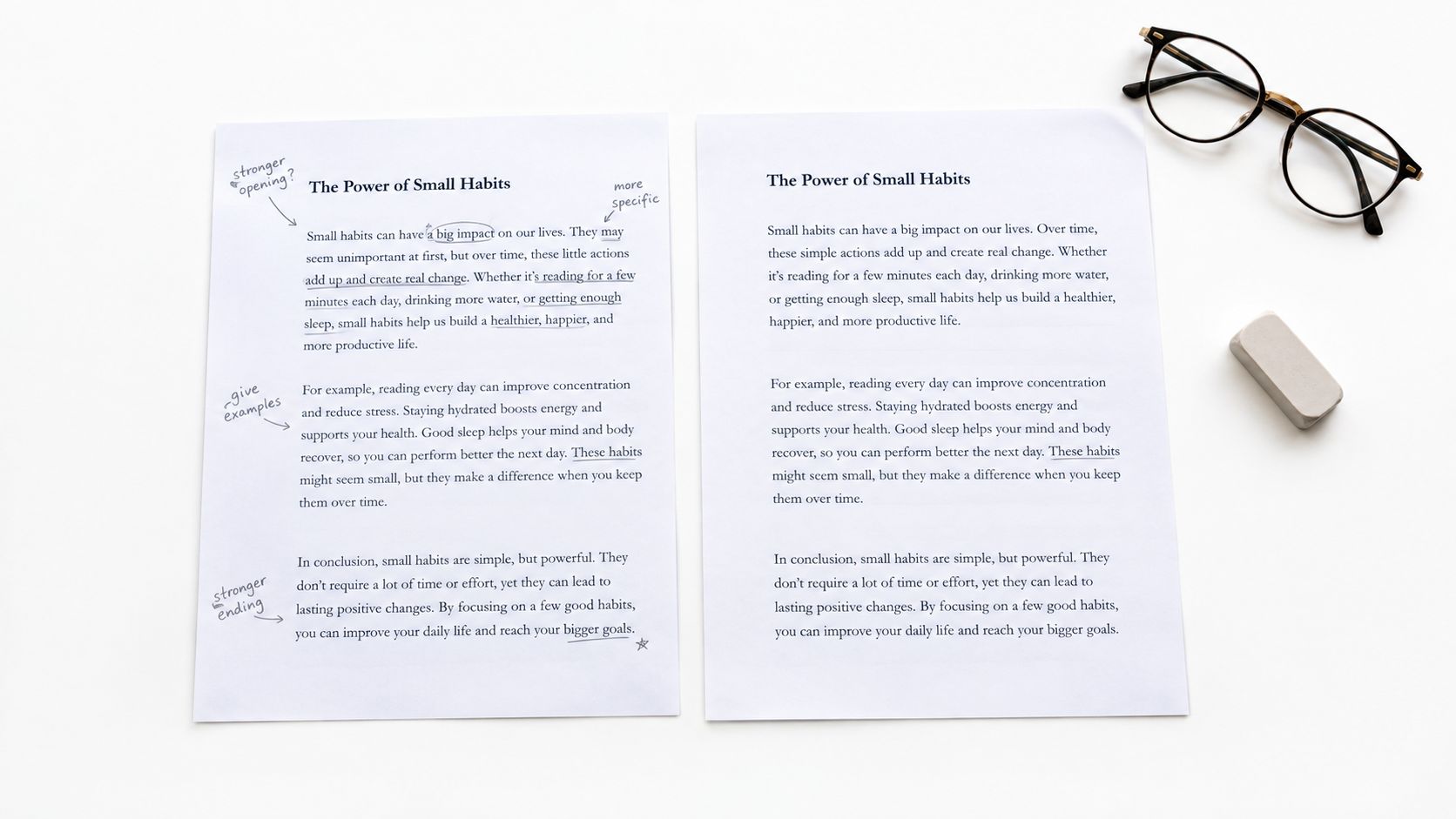
A revision pass might mean cutting a weak opening, moving a section higher, replacing vague claims with concrete explanation, or changing the order of ideas so the reader can follow the logic. That's different from proofreading. You're not fixing commas yet. You're fixing communication.
What to change in revision
Look for issues that affect meaning and flow first.
- Structure: Does the piece start in the right place and move logically?
- Clarity: Are any sections confusing, vague, or overloaded?
- Relevance: Does every paragraph help the reader?
- Support: Do examples and evidence appear where readers need them?
- Tone: Does the writing sound right for the audience and context?
For content teams, readability and audience fit usually improve most. For developers, revision often means simplifying technical explanation without losing accuracy. For students and academics, it can mean checking whether each paragraph supports the thesis instead of drifting into summary.
If coherence is the issue, this article on improving coherence in writing gives practical ways to connect ideas more clearly.
A useful habit is to revise in layers. One pass for structure. One for clarity. One for tone. That keeps you from trying to solve everything at once.
A short walkthrough can help you see that process in action.
<iframe width="100%" style="aspect-ratio: 16 / 9;" src="https://www.youtube.com/embed/5hVLyZFEkXo" frameborder="0" allow="autoplay; encrypted-media" allowfullscreen></iframe>Revision test: If you remove a paragraph and the piece gets clearer, that paragraph probably wasn't doing enough work.
RewriteBar fits well here because revision often involves comparison. Side-by-side edits, tone variations, and repeatable multi-step workflows can help you test alternatives quickly. Still, you need to choose the version that best matches your purpose.
4. Editing & Proofreading
Editing and proofreading are the quality-control passes of the writing process. Revision changes ideas and structure. This stage checks whether the finished version reads cleanly, sounds consistent, and looks ready for a real reader.
For that reason, it works best after big changes are done. If you are still rearranging sections or rewriting your main point, save detailed cleanup for later.
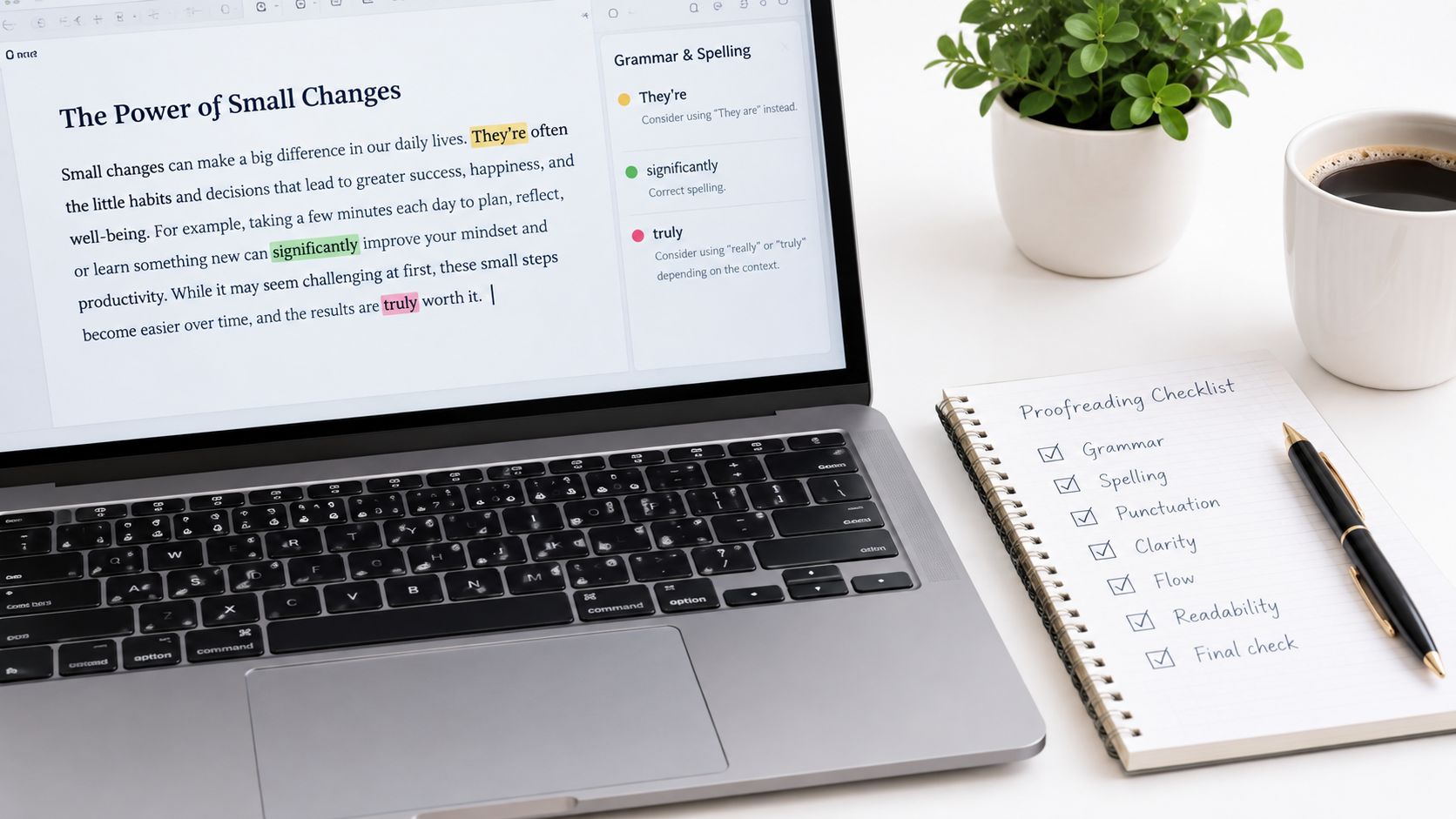
Here is a practical way to separate the two:
- Editing checks the sentence. Is it clear, correct, and consistent?
- Proofreading checks the final surface. Did any typos, formatting errors, or small mistakes survive?
A short-form piece and a long-form piece need different versions of this workflow.
For a Slack message, sales email, or social caption, editing may take one quick pass for wording and one final pass for mistakes. For a blog post, report, or research paper, you usually need several focused passes because errors hide inside length. The longer the piece, the more helpful it is to inspect one issue at a time.
Try this sequence.
First, read only for correctness. Fix grammar, punctuation, spelling, and broken phrasing. Then read only for consistency. Check capitalization, terminology, numbers, headings, and formatting choices. Last, proofread the near-final version as if you were the audience receiving it on the actual platform.
That last step matters more than it sounds. A paragraph can look fine in a draft doc and break badly in an email, CMS, or submission form.
A clean editing pass usually answers these questions
- Did I use the same term for the same thing throughout?
- Do any sentences sound tangled when read aloud?
- Are punctuation and capitalization consistent?
- Do links, headings, bullets, and spacing match the format?
- Would the intended reader trip over any phrase, even if it is technically correct?
If you want a repeatable sequence, use a proofreading checklist you can apply before publishing or sending. If voice is part of the problem, pair that with analyzing writing style step-by-step so you can check whether the piece sounds like you, your team, or the publication.
A quick example helps.
A student might proofread for citation format and repeated wording. A product marketer might check brand terms, link accuracy, and CTA consistency. A developer might scan a README for command formatting, code-label consistency, and wording that could confuse a new user.
RewriteBar can help during this stage because editing often involves small, repeated decisions. You may want a clearer sentence, a more neutral tone, or a shorter version of a paragraph without changing the meaning. That is useful for support replies, essays, documentation, and client emails. It does not replace judgment. You still need to approve the final wording against your rubric, style guide, legal requirements, or audience expectations.
One rule keeps this stage efficient: proofread the version you will send. Not the one you meant to send. Not the one from ten minutes ago. The actual final file, post, email, or document.
5. Publishing & Sharing
Publishing is the handoff point. Your draft stops being private working material and starts doing a job in the world.
That job changes by format. A two-line Slack update needs speed and clarity. A blog post needs scannable structure. A README needs commands, labels, and examples that work when someone copies them. A research submission needs exact naming, file, and citation rules.
It helps to treat this stage like a release check, similar to shipping software. You are not rewriting the whole piece. You are confirming that the version going out matches the audience, the channel, and the stakes.
Here is a practical way to check that.
For short-form writing, ask: can the reader act right away?
Examples include emails, social posts, support replies, and internal updates.
Quick release check:
- Is the main point visible in the first line or two?
- Does the call to action match the channel?
- Are names, dates, links, and attachments correct?
- Could any sentence sound sharper, colder, or more certain than you intend?
For long-form writing, ask: can the reader move through it without getting lost?
Examples include articles, essays, documentation, reports, and case studies.
Final release check:
- Do the title and headings match what the piece delivers?
- Do images, links, bullets, and spacing display correctly?
- Are claims supported and examples placed where readers need them?
- Does the ending tell the reader what to do, think about, or use next?
The audience also changes what "finished" means. A student may need to follow submission rules exactly. A marketer may need brand review and working links. A founder may need legal or team approval before a public update goes out. A developer may need to test every command in published docs, not just skim them.
RewriteBar fits here as a narrow tool, not a substitute for judgment. Use it for a final tone check, a shorter version of a summary, or a cleaner sentence when the wording is close but not ready. That is useful for both short-form and long-form work. You still decide whether the final version is accurate, appropriate, and ready for the people who will read it.
One last point matters because this process is a workflow, not a school assignment with a hard stop. Publishing creates feedback. If readers miss the point of a LinkedIn post, your short-form workflow needs a better opening. If users stumble in your documentation, your long-form workflow may need stronger examples or headings. Sharing is the end of one cycle and the start of the next one.
5-Step Writing Process Comparison
| Stage | 🔄 Implementation complexity | ⚡ Resource & time requirements | 📊 Expected outcomes (⭐) | 💡 Ideal use cases | ⭐ Key advantages |
|---|---|---|---|---|---|
| Prewriting & Planning | 🔄 Medium, structured, front-loaded | ⚡ Low–Medium, research and outlining time | 📊 ⭐⭐⭐⭐, clear direction, fewer mid-draft pivots | 💡 Blog outlines, docs architecture, pitch planning, multilingual prep | Saves revision time; clarifies audience & tone |
| Drafting & First Writing | 🔄 Low, free-flowing, low setup | ⚡ High output speed, low deliberation per pass | 📊 ⭐⭐⭐, lots of raw material but needs cleanup | 💡 Rapid drafts, social posts, PR/commit messages, brainstorming | Generates momentum; captures authentic voice |
| Revising & Rewriting | 🔄 High, iterative macro + micro edits | ⚡ High, multiple passes and workflows required | 📊 ⭐⭐⭐⭐, improved coherence, structure, engagement | 💡 Long-form edits, documentation refactor, thesis/pitch refinement | Transforms drafts into polished, coherent pieces |
| Editing & Proofreading | 🔄 Low–Medium, technical, detail-oriented | ⚡ Moderate, focused passes for errors & consistency | 📊 ⭐⭐⭐⭐⭐, error-free, consistent, professional final text | 💡 Final checks before send/publish, academic and legal content | Catches errors; enforces style, formatting, terminology |
| Publishing & Sharing | 🔄 Medium, platform-specific formatting & QA | ⚡ Variable, depends on channels and distribution steps | 📊 ⭐⭐⭐⭐, live content with measurable reach & engagement | 💡 Blog posts, emails, repos, presentations, multilingual release | Ensures channel-appropriate format and final quality assurance |
Make the Process Fit the Writing Task
The five steps of the writing process work best when you scale them to the job in front of you. You don't need the same depth for every piece.
For short-form writing, keep the workflow lean. Use a quick planning note, write the draft in one pass, revise once for clarity, then proofread details before sending. That approach works for emails, status updates, short posts, support messages, and pull request descriptions. You still follow the process. You just compress it.
Long-form writing needs more space between stages. Plan the structure more carefully, gather terminology or source material early, draft in sections, revise for flow and logic, and save sentence-level cleanup for the end. That's the better approach for essays, technical documentation, reports, landing pages, and investor materials.
Different audiences also need different checks. Non-native English speakers should protect meaning first, then refine naturalness and tone. Developers should verify technical accuracy themselves, even if a tool helps simplify the wording. Students and academics should compare the final version against the assignment, rubric, or style guide. Content teams should make sure the voice matches the brand, not just general grammar rules.
The useful mindset is simple. Treat writing as a repeatable workflow, not a one-time burst of inspiration. Plan enough to stay focused. Draft without freezing. Revise where the meaning is weak. Edit where the language is off. Publish only after the format and message fit the audience.
A simple checklist for your next piece looks like this:
- Define the goal: Write down the audience, purpose, and format.
- Draft the message: Get the core ideas onto the page before polishing.
- Revise the structure: Reorder, cut, expand, or clarify where needed.
- Proofread the details: Clean up grammar, punctuation, consistency, and formatting.
- Confirm before sharing: Check that the final version fits the channel and audience.
If you want support at selected points in that workflow, RewriteBar is one option that can help with grammar, clarity, tone, translation, and repeatable editing steps without replacing your judgment. The strongest process still ends the same way. You decide what the writing means, and you decide when it's ready to share. For additional offline practice, a printable writing process resource can help you turn these steps into a habit.
If you want a writing assistant that fits this workflow, RewriteBar lets you improve text inside the apps you already use on macOS. You can trigger grammar, tone, clarity, translation, and custom multi-step workflows at the stage where they help, whether that's drafting, revising, or final proofreading.

More to read
How to Use AI for Writing (2026 Practical Workflow)
Learn how to use AI for writing with a step-by-step workflow covering prompt templates, editing, privacy options, and ready-to-use examples for every task.
Grammarly Alternative for Mac: Best Picks for 2026
Looking for a Grammarly alternative for Mac? Compare the best options for grammar, tone, privacy, offline use, integrations, and pricing in 2026.
How to Improve Writing Speed Without Sacrificing Quality
Learn how to improve writing speed with proven workflows, typing tricks, and AI tools to draft faster, edit smarter, and stay in flow.
Tags
Written by
Mathias MichelPublished
September 20, 2026